> ## Documentation Index
> Fetch the complete documentation index at: https://docs.superintern.ai/llms.txt
> Use this file to discover all available pages before exploring further.
# My Day Overview
> Your daily command center — action items, calendar, scheduled tasks, and daily reports, organized into tabs.
My Day surfaces everything that needs your attention today. It's organized into tabs — a sidebar on desktop, a tab bar on mobile — so you can move between your action items, calendar, scheduled tasks, and daily reports without leaving the page.
## The Tabs
Items your intern surfaces for your attention — content drafts, emails to reply to, alerts,
and your todos. This is the default tab.
Your upcoming events, with one-click meeting attendance for your intern's bot.
The recurring and one-off work your intern runs on a schedule.
Today's recap of what your intern did for you, with time-saved metrics.
On desktop, the tabs live in a collapsible sidebar on the left. On mobile, they appear as a
horizontal tab bar at the top. Each tab keeps its own URL (`?tab=...`), so you can bookmark or
share a specific view.
***
## Action Items
The default tab. Your intern lists items it has brought to your attention — things it proactively noticed, or drafts and tasks it has prepared for your review.
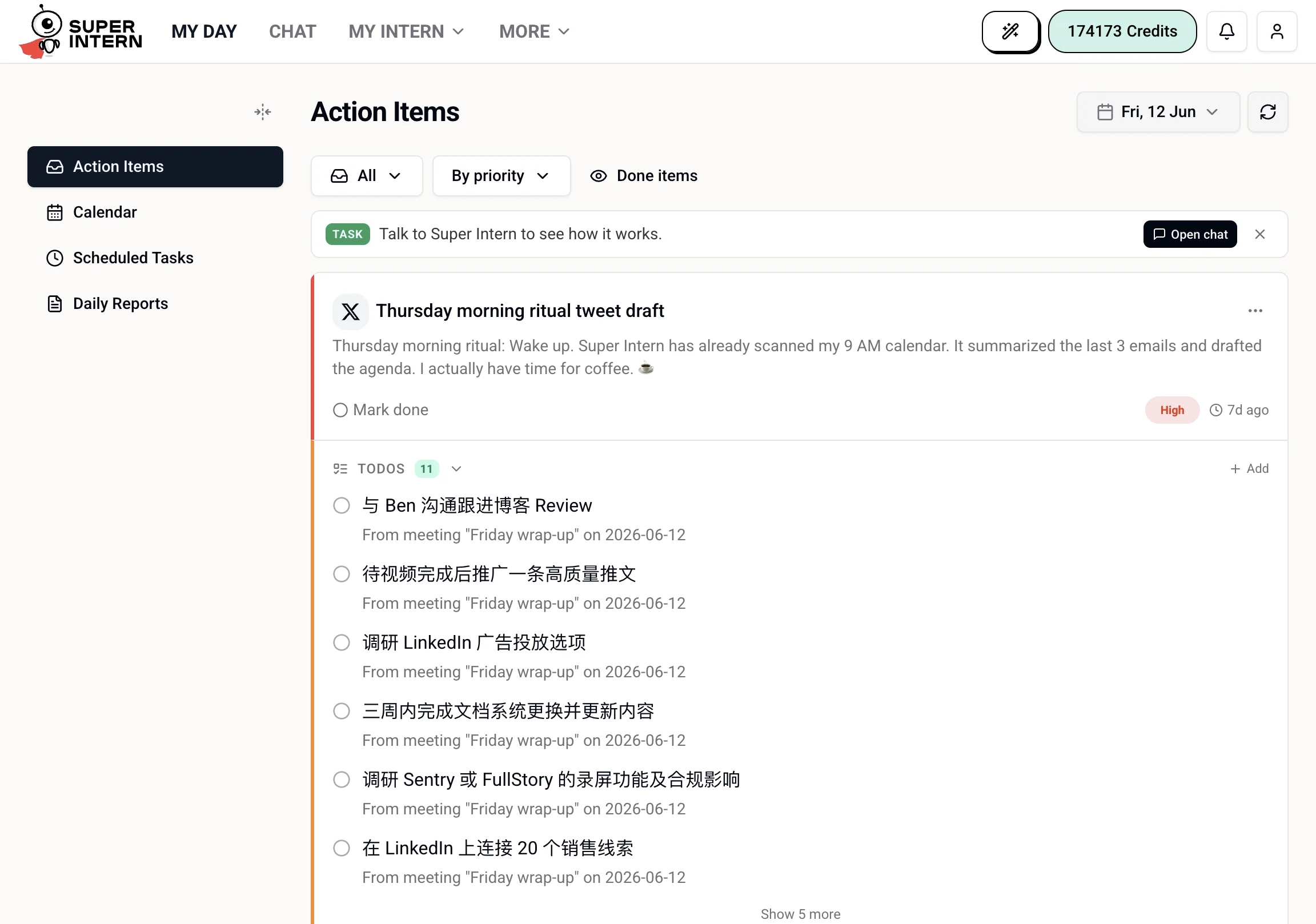 Common examples:
* A social media comment draft ready for you to approve or edit
* An email awaiting a reply
* A commitment you made in a meeting ("I'll send that over by Friday")
* A follow-up from a task that completed
Your [todos and reminders](/my-day/todos-and-reminders) also appear here — use the type filter to see just todos.
From this tab you can review each item and **Mark done** (completed items can be restored with **Back to active**), and use the date picker to look back at previous days. See [Action Items](/my-day/action-items) for the full breakdown.
***
## Calendar
Your schedule, with each event showing the title, time, and a **Join** button for meetings with a supported video link. You can also toggle **Auto-join** to have your intern automatically join all accepted meetings as they start.
Common examples:
* A social media comment draft ready for you to approve or edit
* An email awaiting a reply
* A commitment you made in a meeting ("I'll send that over by Friday")
* A follow-up from a task that completed
Your [todos and reminders](/my-day/todos-and-reminders) also appear here — use the type filter to see just todos.
From this tab you can review each item and **Mark done** (completed items can be restored with **Back to active**), and use the date picker to look back at previous days. See [Action Items](/my-day/action-items) for the full breakdown.
***
## Calendar
Your schedule, with each event showing the title, time, and a **Join** button for meetings with a supported video link. You can also toggle **Auto-join** to have your intern automatically join all accepted meetings as they start.
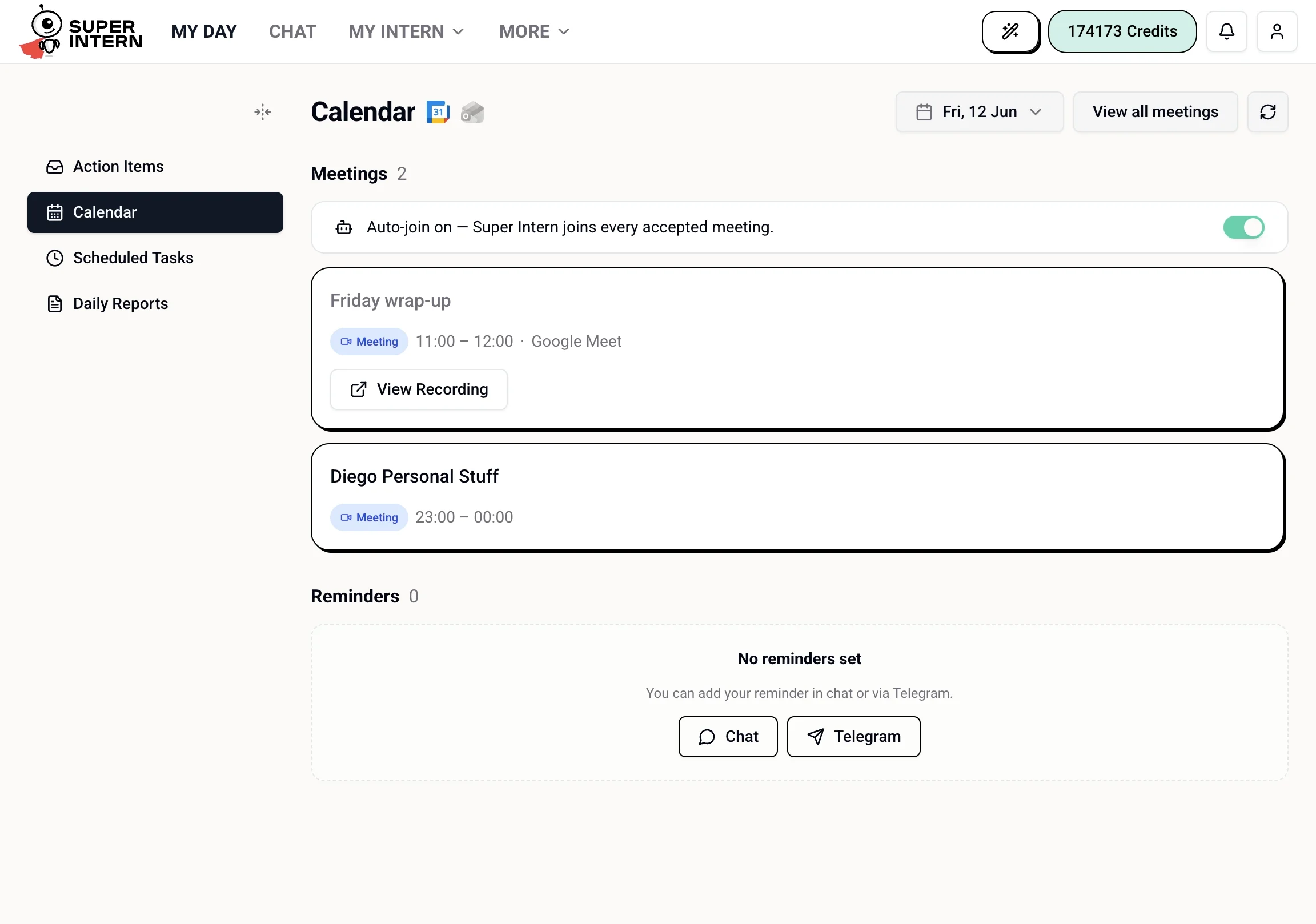 See [Calendar & Meetings](/my-day/calendar-and-meetings) for setup and supported platforms.
***
## Scheduled Tasks
A view of the recurring and scheduled work your intern runs — what ran, what's coming up, and the status of each task. The same information is available in the full **My Intern → Scheduled Tasks** page; see [Scheduled Tasks](/tasks).
See [Calendar & Meetings](/my-day/calendar-and-meetings) for setup and supported platforms.
***
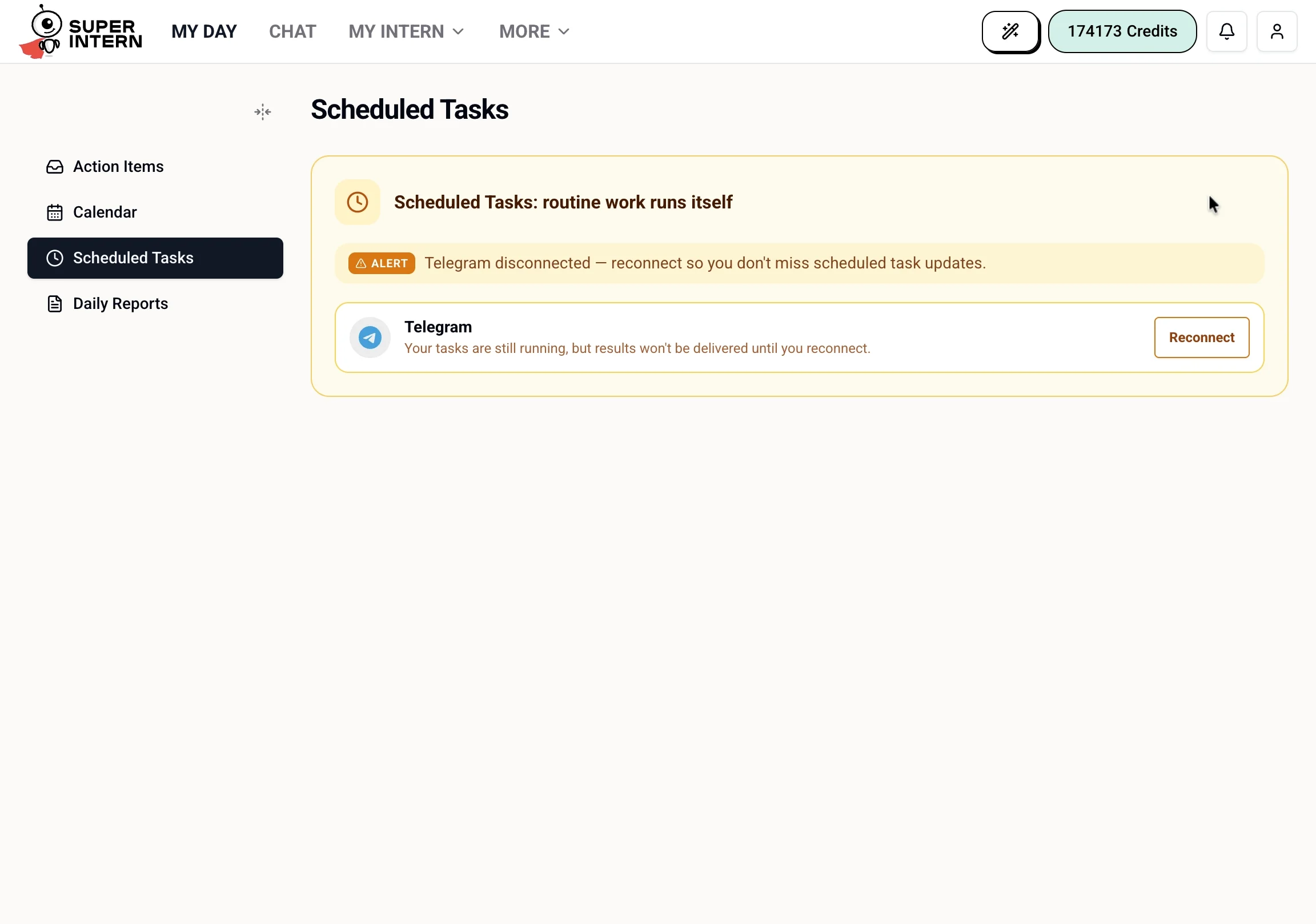
## Scheduled Tasks
A view of the recurring and scheduled work your intern runs — what ran, what's coming up, and the status of each task. The same information is available in the full **My Intern → Scheduled Tasks** page; see [Scheduled Tasks](/tasks).
 ***
## Daily Reports
Today's recap: a generated summary of what your intern handled, plus metrics like emails processed, meetings summarized, and estimated time saved. You can also set the delivery time for your daily report here. For the full history and details, see [Reports](/report).
***
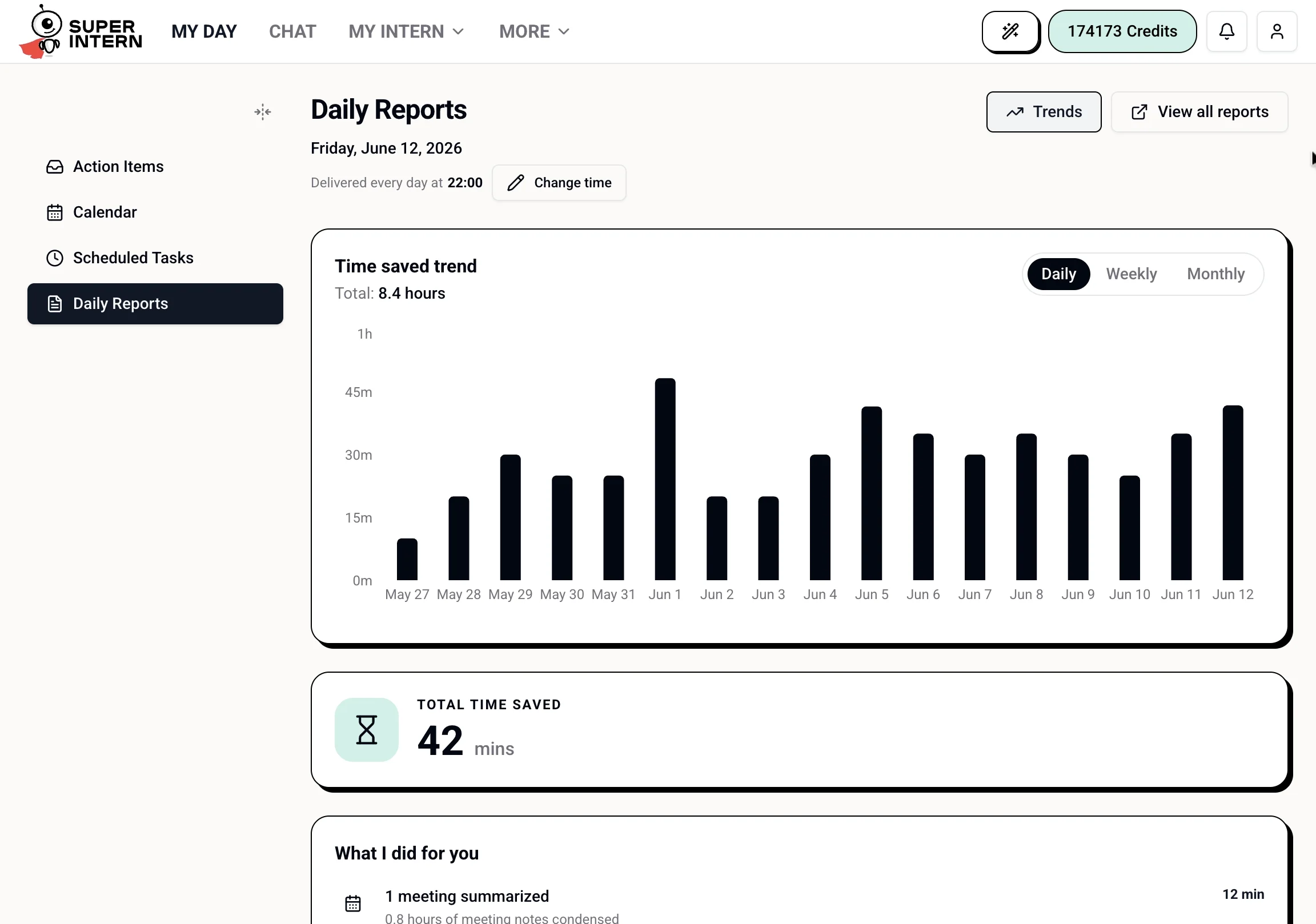
## Daily Reports
Today's recap: a generated summary of what your intern handled, plus metrics like emails processed, meetings summarized, and estimated time saved. You can also set the delivery time for your daily report here. For the full history and details, see [Reports](/report).
 ***
## Time Tracker (Beta)
Agents enrolled in the beta program see an additional **Time Tracker** tab for tracking time spent on work.
***
## Interacting from Chat vs. My Day
Everything on My Day can also be handled in chat. My Day is for a quick visual scan; chat is for nuance, follow-ups, and anything that needs more back-and-forth.
| My Day | Chat equivalent |
| ---------------------- | --------------------------------- |
| Approve an action item | `Approve the follow-up to Jake` |
| See your todos | `What do I have on my todo list?` |
| Check your calendar | `What's on my calendar today?` |
| Join a meeting | `Join my 3pm call and take notes` |
My Day is a snapshot, not a full inbox. For deeper searches — "find all emails from Jake last
month" or "show me every action item I dismissed this week" — use chat.
***
## Time Tracker (Beta)
Agents enrolled in the beta program see an additional **Time Tracker** tab for tracking time spent on work.
***
## Interacting from Chat vs. My Day
Everything on My Day can also be handled in chat. My Day is for a quick visual scan; chat is for nuance, follow-ups, and anything that needs more back-and-forth.
| My Day | Chat equivalent |
| ---------------------- | --------------------------------- |
| Approve an action item | `Approve the follow-up to Jake` |
| See your todos | `What do I have on my todo list?` |
| Check your calendar | `What's on my calendar today?` |
| Join a meeting | `Join my 3pm call and take notes` |
My Day is a snapshot, not a full inbox. For deeper searches — "find all emails from Jake last
month" or "show me every action item I dismissed this week" — use chat.