> ## Documentation Index
> Fetch the complete documentation index at: https://docs.superintern.ai/llms.txt
> Use this file to discover all available pages before exploring further.
# Overview
> Action items are drafts and alerts your intern prepares and surfaces in the Action Items tab of My Day for your review.
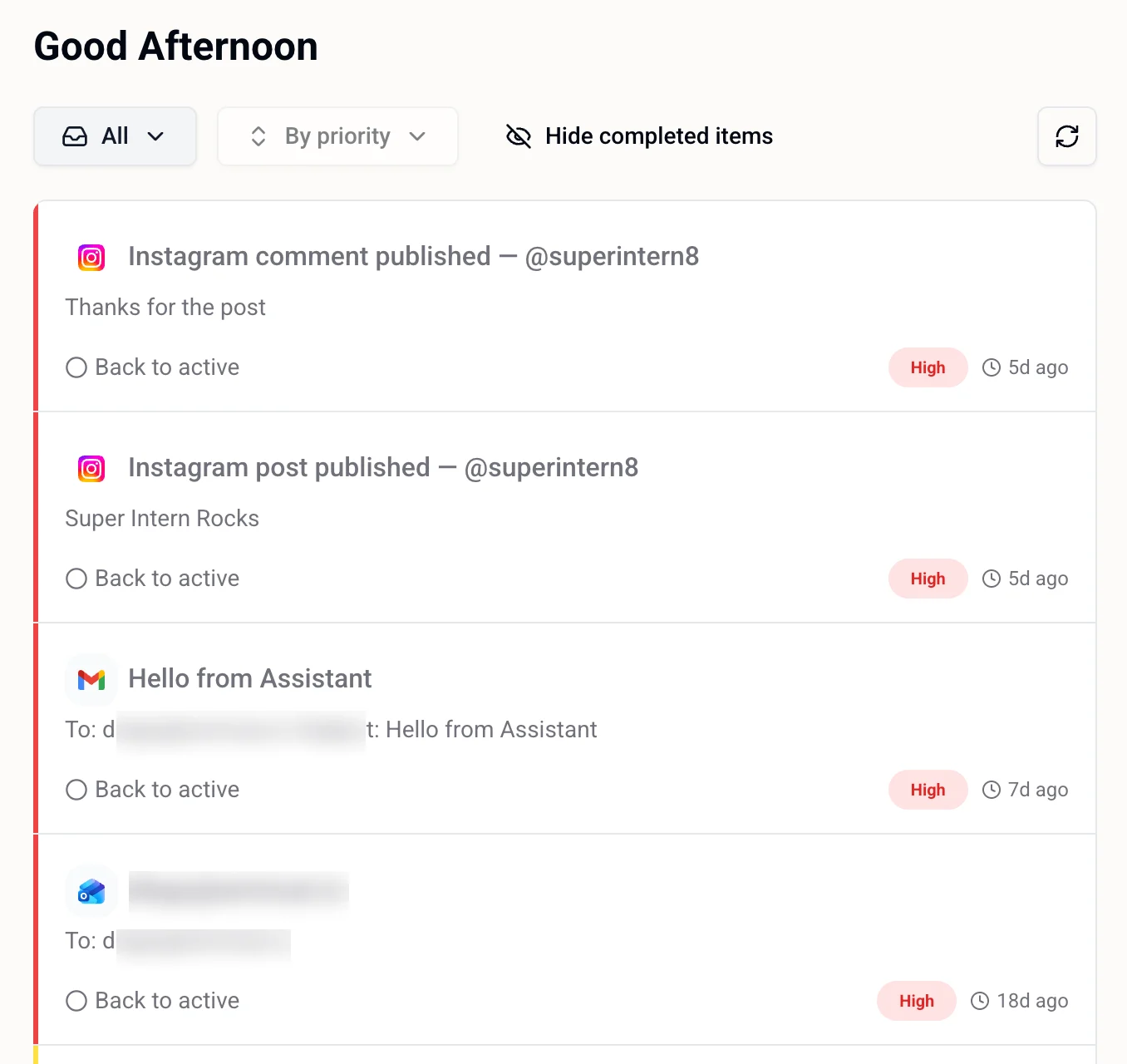
Action items are things your intern has prepared or noticed that need your attention. They show up in the **Action Items** tab of [My Day](/my-day/overview) — the default tab when the page opens — and stay there until you mark them done.
 ***
## Types of Action Items
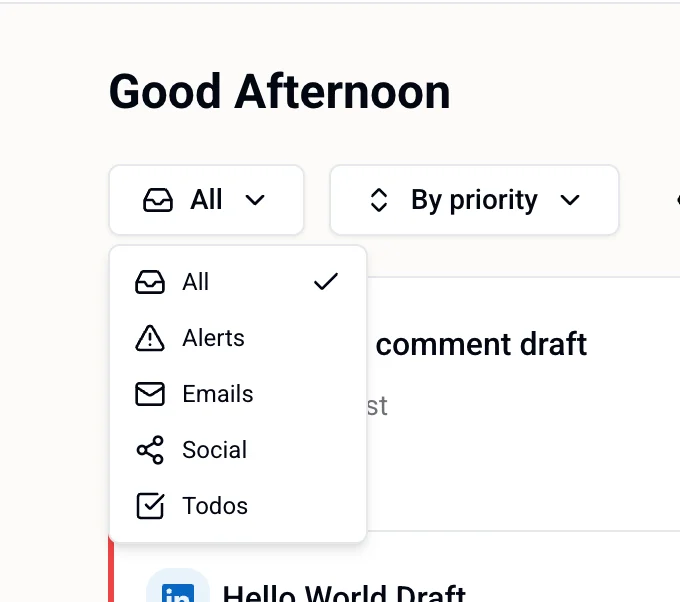
Action items are grouped into three categories, which you can filter using the **All** dropdown at the top of the Action Items tab.
***
## Types of Action Items
Action items are grouped into three categories, which you can filter using the **All** dropdown at the top of the Action Items tab.
 ### Alerts
Time-sensitive notifications your intern wants to flag — things that may need your attention or a quick decision.
### Emails
Draft emails your intern has composed on your behalf. Each item shows the recipient, subject line, and a preview of the body.
### Social
Draft posts and comments your intern has prepared for your connected social accounts — Instagram, LinkedIn, TikTok, and Twitter/X. Each item shows the platform, the account, and a preview of the draft content.
Examples:
* *Instagram comment draft — @youraccount* — a reply your intern wrote to a recent comment on your post
* *LinkedIn post draft* — a post ready for your review before it goes live
***
## Reviewing an Item
Each action item shows:
* **Platform icon** — where it came from (Gmail, Instagram, LinkedIn, etc.)
* **Title** — what the draft or alert is about
* **Preview** — a snippet of the content
* **Priority** — High, Medium, or Low
* **Timestamp** — how long ago it was created
When you're done with an item, click **Mark done**. Completed items move out of the active view but can be restored with **Back to active** if needed.
***
## Filtering and Sorting
Use the controls at the top of the Action Items tab to manage the list:
* **Filter by type** — All, Alerts, Emails, Social, or Todos
* **Sort** — By priority (default)
* **Show / Hide completed items** — toggle to see items you've already marked done
* **Date picker** — jump to a previous day to review its items
***
## Related
* [Todos & Reminders](/my-day/todos-and-reminders) — things you've explicitly asked your intern to track
* [Scheduled Tasks](/tasks) — longer multi-step automations your intern runs on your behalf
* [Calendar & Meetings](/my-day/calendar-and-meetings) — your schedule and meeting controls
* [Settings](/intern/settings) — standing rules about what your intern can act on without asking
* [Integrations](/integrations/third-party) — connect social and email accounts to get more action items
### Alerts
Time-sensitive notifications your intern wants to flag — things that may need your attention or a quick decision.
### Emails
Draft emails your intern has composed on your behalf. Each item shows the recipient, subject line, and a preview of the body.
### Social
Draft posts and comments your intern has prepared for your connected social accounts — Instagram, LinkedIn, TikTok, and Twitter/X. Each item shows the platform, the account, and a preview of the draft content.
Examples:
* *Instagram comment draft — @youraccount* — a reply your intern wrote to a recent comment on your post
* *LinkedIn post draft* — a post ready for your review before it goes live
***
## Reviewing an Item
Each action item shows:
* **Platform icon** — where it came from (Gmail, Instagram, LinkedIn, etc.)
* **Title** — what the draft or alert is about
* **Preview** — a snippet of the content
* **Priority** — High, Medium, or Low
* **Timestamp** — how long ago it was created
When you're done with an item, click **Mark done**. Completed items move out of the active view but can be restored with **Back to active** if needed.
***
## Filtering and Sorting
Use the controls at the top of the Action Items tab to manage the list:
* **Filter by type** — All, Alerts, Emails, Social, or Todos
* **Sort** — By priority (default)
* **Show / Hide completed items** — toggle to see items you've already marked done
* **Date picker** — jump to a previous day to review its items
***
## Related
* [Todos & Reminders](/my-day/todos-and-reminders) — things you've explicitly asked your intern to track
* [Scheduled Tasks](/tasks) — longer multi-step automations your intern runs on your behalf
* [Calendar & Meetings](/my-day/calendar-and-meetings) — your schedule and meeting controls
* [Settings](/intern/settings) — standing rules about what your intern can act on without asking
* [Integrations](/integrations/third-party) — connect social and email accounts to get more action items